What's new

Every ReArc release, and why you'll love it.

ReFocused · ReStored · ReArc

  1. 749New features
  2. 677New features
  3. 608New features
  4. 564New features
  5. 544Security release
  6. 500Onboarding and import
  7. 469First alpha

New features·ReArc 2026.1112.749·

A command bar that moves like Arc's.

Site search shortcuts with a Tab, containers that stay in their profile, profiles you can tell apart, and an update notice the way Arc showed it.

Type a keyword, press Tab.

⌘T opens a solid card over the page, with no dimming behind it and the selected row in your space's colour. Results come in a clearer order: open tabs that start with what you typed, then the site it completes to, then a plain search, then history, and an empty ⌘T lists your five most recent tabs. Site search shortcuts work like Arc's: type a site search's keyword and press Tab, and the site's name becomes a chip in the site's colour while the list folds away. From then on only your earlier searches on that site are suggested. While a chip is on, what you type goes nowhere until you press Return; the exception is your default search engine, which suggests as it does in the plain bar. Bring your site searches with you: File › Import from Another Browser… has a new Site searches choice for Arc, Chrome and the other Chromium browsers.
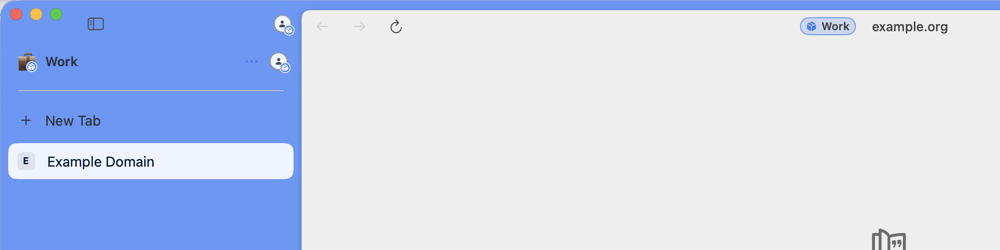
A space that is a container: the Work chip beside the address, and the container badge on the space icon and the avatars

Containers that stay in their profile.

New Container for This Space now keeps the space where it is, in the same profile and the same place in the strip, and gives it its own cookies, sign-ins and site data. A container is no longer listed as a profile. Every tab in a container shows a chip with the container's name in the address area, in split panes, in its hover card and in a Peek, and the space's icon carries a badge. Remove Container… in the space menu puts the space back in the profile's own session, after a confirmation.
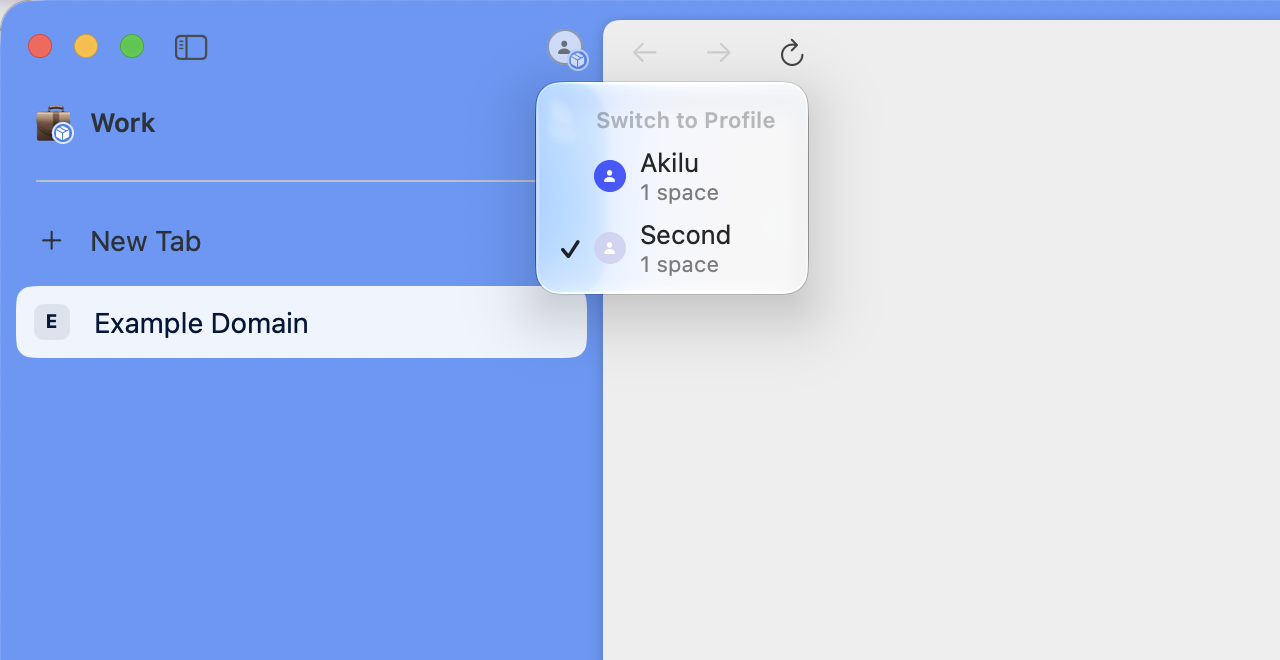
The Switch to Profile menu: each profile with its avatar, its number of spaces, and a checkmark on the active one

Profiles you can tell apart.

Profile menus show each profile's avatar, how many spaces it has and a checkmark on the active one. An avatar can be a picture now: Settings › Profiles › Avatar and colour › Edit… › Choose Image…, or drop or paste one. ReArc keeps a small copy with the metadata removed, on this Mac only. Settings › Profiles also shows which profiles are in iCloud and lists the ones that are only there, and Delete from iCloud… removes one after saving what it deletes to ReArc's Backups folder.

Updates, the way Arc showed them.

A pill at the bottom of the sidebar reads New ReArc Version Available. Rest the pointer on it for Automatic Updates and Restart and Update, which installs and reopens ReArc with your windows. A security fix reads Critical Update Available, and an update a build can no longer do without reads Required Update. Neither forces anything: you choose when to restart.
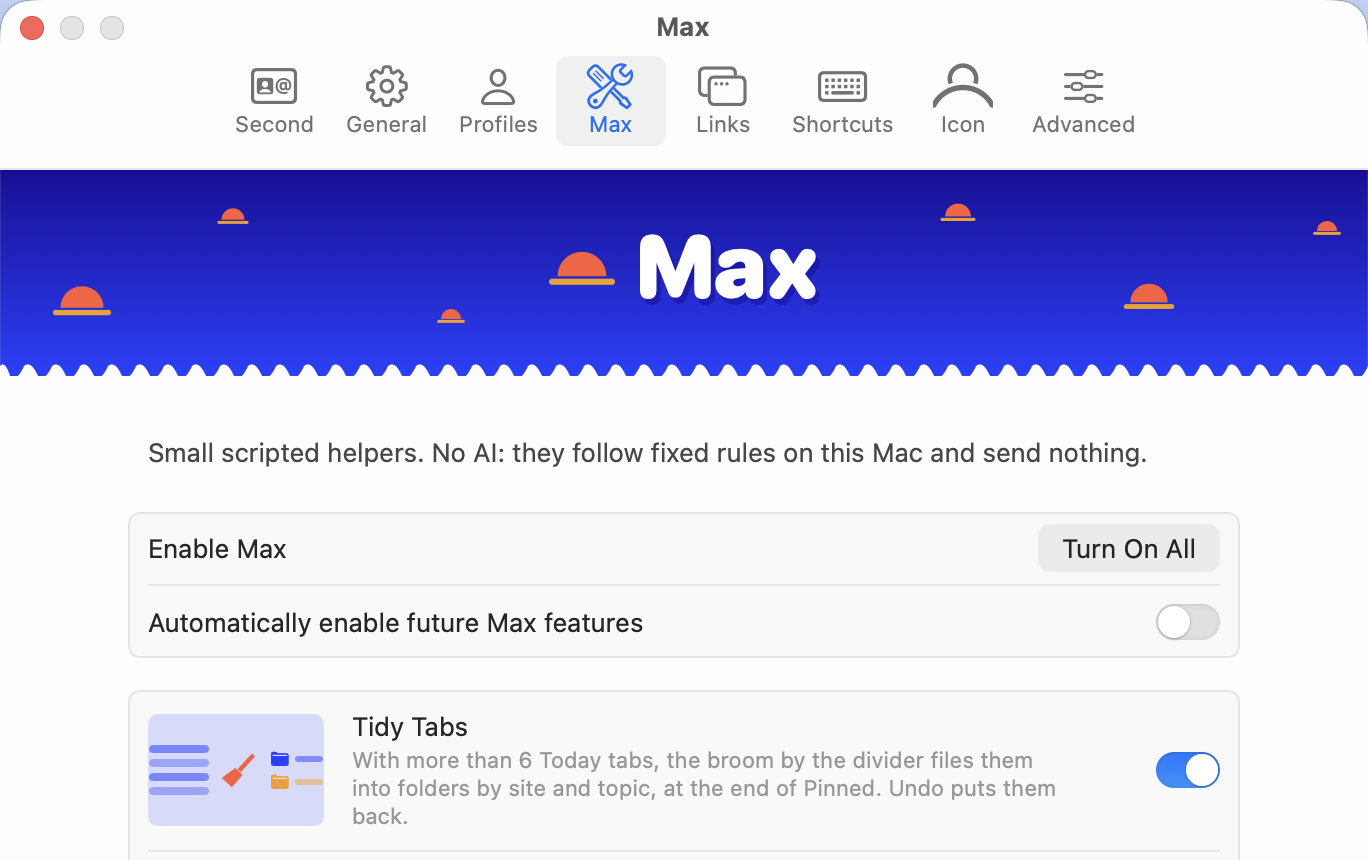
Settings, Max: "Small scripted helpers. No AI: they follow fixed rules on this Mac and send nothing." above Tidy Tabs, Instant Links, Tidy Tab Titles and Tidy Downloads

Settings › Max is back, and none of it is AI.

Tidy Tab Titles, Tidy Downloads, Tidy Tabs and Instant Links are small scripted helpers: each follows fixed rules on your Mac and sends nothing anywhere. The assistants in the command bar are only shortcuts that open ChatGPT, Claude or another company's own site with what you typed. ReArc itself runs no AI. Everything in the tab is off until you turn it on. Tidy Tab Titles shortens a tab's title when you pin it, Tidy Downloads gives a finished download a clearer name without overwriting anything, Tidy Tabs files a crowded Today into folders with one Undo, and Instant Links opens a search's first result with ⇧↩.
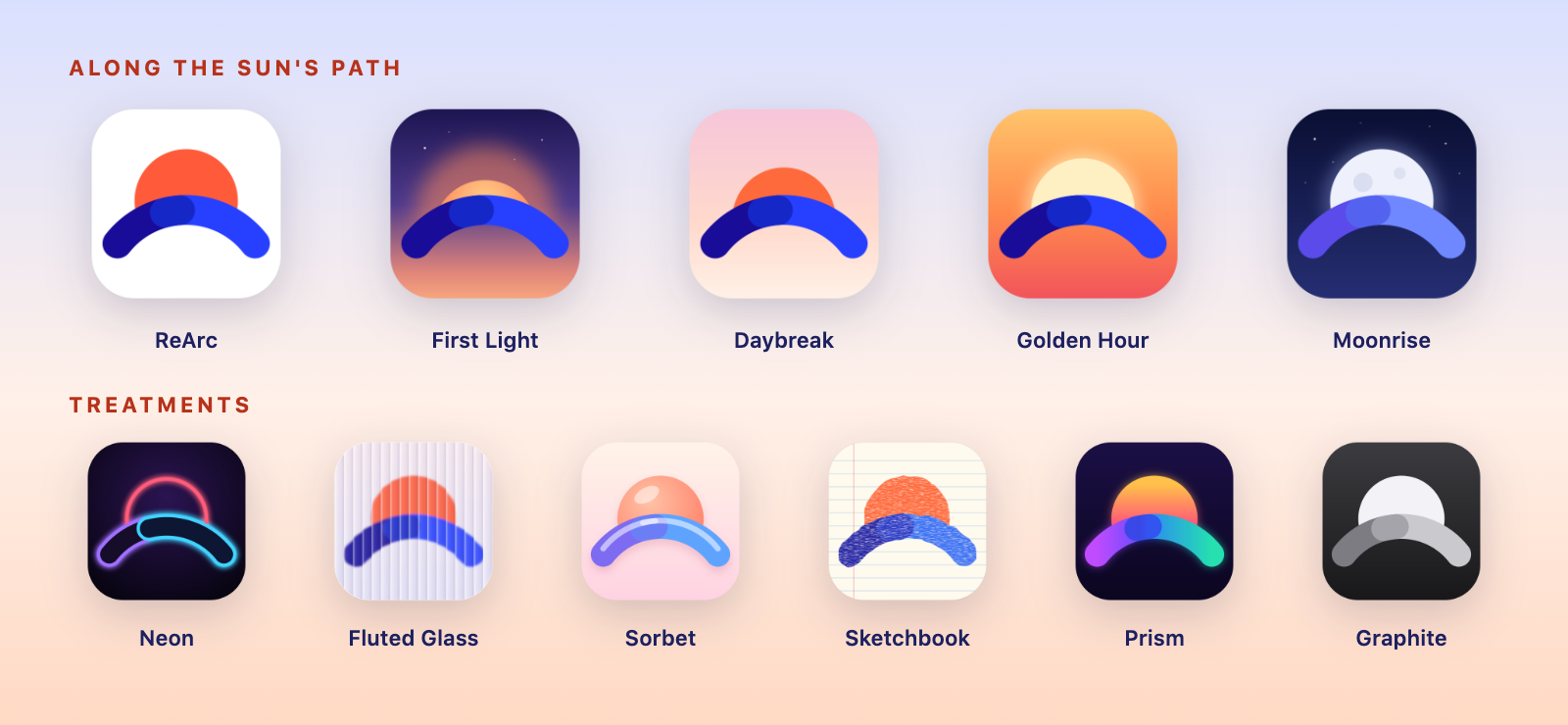
The eleven app icons: ReArc, First Light, Daybreak, Golden Hour and Moonrise along the sun's path, and Neon, Fluted Glass, Sorbet, Sketchbook, Prism and Graphite as treatments

Eleven new icons, from ReArc's own sunrise.

Settings › Icon has two lists. Along the Sun's Path shows the mark at five moments of the sunrise: ReArc, First Light, Daybreak, Golden Hour and Moonrise. Treatments shows it in other finishes: Neon, Fluted Glass, Sorbet, Sketchbook, Prism and Graphite. The Dock shows your choice while ReArc is running; Finder and Launchpad keep the standard icon.

Also fixed, changed and good to know

Big Buck Bunny playing in the floating Picture in Picture window while ReArc shows another space, with the sidebar's player naming the tab's space
Picture in Picture, showing the video. Big Buck Bunny © Blender Foundation, CC BY 3.0.
  • Picture in Picture shows the video again. In every build so far the floating video window was black, with sound and no picture. It's now the engine's own window, and it shows the video.
  • You can always find a playing video: the sidebar's player stays whenever the playing tab is off screen, also while the video is in the floating window. Rest the pointer on it to see the space and folder the tab is in; clicking it opens a collapsed folder, scrolls to the tab and switches profile if it needs to.
  • About ReArc shows the latest version: "You have the latest version." with the time it last checked, or the latest version with Restart and Update. Opening About checks quietly, at most once a minute.
  • A new version number: the release date and the build, as in 2026.1112.749. Builds up to 677 were all 0.1.0 with the build in brackets, and updating from them works as before.
  • Play video in the sidebar is gone from Settings › Advanced for now. It used the same drawing that was black, and comes back when that's fixed.
  • Containers you made before this build still show as profiles, because nothing recorded which profile they came from. Settings › Profiles offers Make This a Container of ▸ on any profile with exactly one space, and nothing changes until you choose.
  • Tidy Tabs puts its folders in Pinned, because folders only exist there. Until you undo, those tabs are pinned, and with Sync Sidebar on they sync.
  • A tab playing in another space, or in a call, is no longer archived by Archive tabs after.
  • Deleting a profile deletes its containers too; the confirmation names them.
  • The old alternate icons are gone. If you had chosen one, ReArc shows its standard icon after the update; pick a new one in Settings › Icon.
  • With Instant Links on, ⇧↩ on a plain web search opens the first result. It still opens addresses, tabs, history and site searches in Little ReArc.
  • Auto-hide address bar no longer needs Show URL in toolbar, and the first switch to the mini sidebar mentions it, with a button to the setting.
New features·ReArc 0.1.0 (677)·

Peek is back, the Arc way.

Links open in a floating card you close with a click, a whole selection of tabs answers to one menu, and the sidebar can shrink to icons.

Peek, just like Arc.

⇧-click a link and it opens in a borderless card over the page, with three round buttons floating at its top right: close, expand into a tab, and open in Split View. Click anywhere outside the card, the sidebar included, and it closes. Esc closes it too. Expand it, or press ⌘O, and the page keeps its place: the same scroll position, whatever you typed, and its back history.

Select several tabs at once.

⌘-click adds or removes a row in the sidebar and ⇧-click selects a range, with the tab you're on included. Right-click the selection for one menu that works on all of them: copy their links, plain or as Markdown, pin or unpin them, add them to Favorites, duplicate them, open them in Split View, move them to a folder, a space or another profile, or archive them. Move to Profile asks once and tells you what stays behind: cookies and sign-ins. ⌘C copies the links, ⌘W closes the whole selection, and dragging one row brings the rest.

A sidebar that goes mini.

Press ⇧⌘S and the sidebar shrinks to a column of site icons, in the same order as the full sidebar. ⇧⌘S again brings it back. ⌘S still hides and shows the sidebar, and a mini sidebar comes back mini. Each window remembers its own, and View › Show Mini Sidebar does the same.

Sync Sidebar is off until you turn it on.

608 switched Sync Sidebar on by itself after onboarding, and an older ReArc sidebar in your iCloud could be merged into what you'd just imported without a word. ReArc no longer turns sync on by itself. If Sync Sidebar was on in 602, 605 or 608, it's off after this update; nothing on your Mac or in iCloud changes, and you turn it on again in Settings › Account on each Mac. Turning it on now looks at iCloud first: if a ReArc sidebar is already there, a sheet shows what it holds and lets you use it, replace it, merge both or cancel, and this Mac's sidebar is saved to a backup file before anything changes. Cancel is the default. On a second Mac, using or merging the iCloud sidebar can put spaces in a profile that is new on that Mac, so sites ask you to sign in again there; the sheet warns about it.

Also fixed, changed and hardened

  • Imported spaces no longer look empty, and Arc spaces are no longer duplicated. Earlier builds could leave several copies of one Arc space with the tabs in only one of them. On first launch this build merges the copies into one space and keeps every tab, after saving your sidebar file beside the original.
  • Settings › Account has a new Sidebar in iCloud box that shows what iCloud holds and when it was last edited, with Use on This Mac…, Replace iCloud with This Mac… and Delete iCloud Content….
  • ⇧⌘S was Save Page As in Arc. ReArc never had Save Page As, and the keys now toggle the mini sidebar.
  • The engine is updated to Chromium 156.0.8078.100, Chromium's latest security update for the 156 line.
  • A shipped ReArc no longer accepts a data folder, a profile folder or its test switches from the command line or the environment, and ignores the engine trace switch, so another program can't start it on a folder of its choosing or make it log the pages you visit.
  • Sync uploads a pinned tab's saved address, never the page you happen to have open in it, and only web pages become synced tabs.
  • Boost CSS is checked the way the engine reads it, CSS that arrives in a Boost file waits for your review, and a Boost with no approval record approves nothing.
  • Importing from other browsers opens no links, stays inside the browser's own folder, and limits how deep and how large a bookmarks file it reads.
  • The Delete Profile dialog says when a container's browsing data stays on disk.

Build 677. Newer builds include everything here: ReArc › Check for Updates… gets you the latest.

New features·ReArc 0.1.0 (608)·

Your Arc card comes with you.

Your Arc membership card makes the move, onboarding finds every browser on your Mac, and Safe Browsing finally does its job.

This build replaces 605 and 602, which were both withdrawn within about an hour. 605 lost website data on profiles from earlier builds: local storage read back empty, and a site's IndexedDB data was deleted the first time you opened it in 605. 608 stops that. Sites you didn't open in 605 have all their data; for sites you did, what they kept in IndexedDB before 605 is gone, and their older local storage is still on disk but not yet restored. 602 quit at launch on older profiles; if it won't open, install 608 over it.

Bring your Arc card home.

You earned that card, so it comes with you. In Settings, under your name, choose Import Your Card from Arc: its title, its shape, its colours and your Arc member-since date all come across. Then watch it turn from Arc into ReArc, and replay the moment whenever you like. Randomize it, and the import is still there to bring your original back. From Arc's sign-in file, ReArc reads only your account's creation date and name.

Manage Extensions, one click away.

The site control panel has a Manage link beside the +. One click takes you to your extensions, where you can switch them off, remove them or find more on the Chrome Web Store. Every extension tile's right-click menu has Manage Extensions… too.

Every browser on your Mac, found.

The onboarding's browser step now lists every browser you have, even the ones macOS keeps private. Chrome, Brave and Safari show as Locked, with one Allow access… button that opens System Settings beside the onboarding. Switch ReArc on, come back, and they turn to Found. There's more to import from, too: Edge, Vivaldi, Opera, Opera GX and Chromium, Chrome's Beta, Dev and Canary, Brave Beta and Nightly, Safari's bookmarks, Reading List and history, and Firefox's bookmarks and history. Passwords and cookies are never read.

Safe Browsing, working for real.

ReArc now warns you before known phishing and malware pages and dangerous downloads. Builds 544 and 564 said Safe Browsing was on, but their engine never received Google's threat lists, so they showed no warnings. Now the lists arrive within a few minutes of first launch, Settings › Profiles shows the real state (Starting, On, Not working or Out of date), and a release can't be built unless a test launch receives the lists.

Also new and fixed

  • Website data made by builds 500, 544 and 564 reads back again, and every release now has to read back, in the new build, website data stored by the release before it.
  • HTTP cache and connection partitioning, which 602 and 605 had switched off, are on again.
  • Little Arc is now called Little ReArc.
  • Sync Sidebar is on by default once onboarding finishes, when you're signed in to iCloud. If you turned it off, it stays off, and sync problems show a plain message with the technical text under Details.
  • With the address bar auto-hidden, it shows for three seconds when you arrive at a different site, and stays while a permission, sign-in or certificate prompt is up.
  • Containers stay separate: a popup or new tab from a Little ReArc opens in its container, and links, searches, Boosts and command-bar history no longer cross containers. Deleting a container closes its Little ReArcs and removes its data.
  • Boost CSS needs your approval on each Mac, like Boost scripts, and can't load anything from the web. Approving a script shows its code first.
  • Extension install and permission sheets appear one at a time, and Return always cancels.
  • Sidebar text is readable on every space colour.
  • Syncing Boosts no longer fails, and one rejected record no longer holds up everything else waiting to sync.
  • Settings › Links shows rearc.imara.ae, and Share ReArc links to it.
  • A release build no longer runs its self-test against your real profile.

Build 608. Newer builds include everything here: ReArc › Check for Updates… gets you the latest.

New features·ReArc 0.1.0 (564)·

Every space, its own sign-ins.

Containers arrive: the same site, signed in to a different account in each space. Plus an address bar that knows when to leave, and setup that waits for you.

Correction, 11 November 2026: Safe Browsing didn't work in this build. Build 608 fixes it.

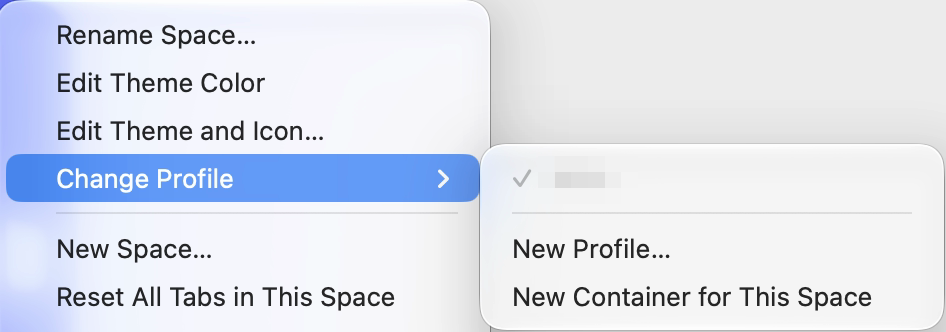
A space's Change Profile menu with New Profile… and New Container for This Space

Containers: a different account in every space.

ReArc supports containers. Give a space its own container, with its own cookies and sign-ins, and the same site can be signed in to a different account in each space. Your work Salesforce in Work, a second Salesforce account in another space, both signed in at once, with no signing out and back in. Create one from the profile badge next to the space name, or from the space's menu › Change Profile › New Container for This Space. Want it everywhere? Settings › General › New spaces can give every new space its own container.

An address bar that knows when to leave.

Turn on Settings › Advanced › Auto-hide address bar and the bar slides away as soon as you move onto the page. Reach for the top edge or press ⌘L and it's back. In split view each pane hides and shows its own. It's off until you want it.

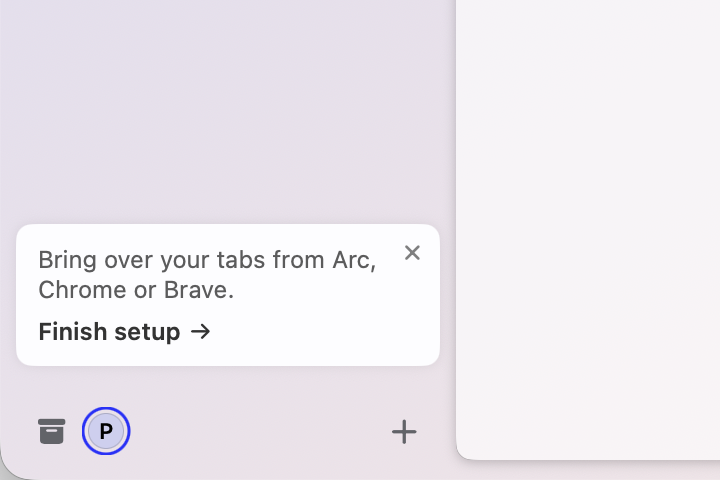
The Finish setup card at the bottom of the sidebar

Skipped setup? It waited for you.

Chose Onboard later? A Finish setup card sits at the bottom of the sidebar, and ReArc › Finish Setting Up ReArc… is in the menu, both ready to import from Arc, Chrome or Brave when you are. Import, or choose Start Fresh, and they step aside.

Also fixed

  • The profile badge next to the space name is legible on every theme, and the profile list always shows your profiles, New Profile… and New Container for This Space.
  • The New Tab row in the sidebar is easier to read on coloured themes.
  • Opening split view while the page has keyboard focus no longer crashes.
  • Editing or removing a boost while its page loads no longer leaves the old boost applied.

Build 564. Newer builds include everything here: ReArc › Check for Updates… gets you the latest.

Security release·ReArc 0.1.0 (544)·

Hardened from the inside.

An engine with Chrome's latest security fixes, and protections that work quietly so you don't have to think about them.

Correction, 11 November 2026: Safe Browsing was meant to arrive in this build, but it didn't work until build 608.

Chrome's security fixes, in ReArc.

The engine moves to Chromium 156.0.8078.96, with 65 security fixes from Google, including one that was being exploited in the wild. And release builds now refuse an engine that is behind Chrome's latest Mac security release.

Extensions on your terms.

Extensions from another browser install from the Chrome Web Store only, and only the ones counted when you agreed. If a Web Store version asks for more permissions than your old copy had, ReArc asks you first.

Prompts you can't be rushed through.

Permission prompts ignore clicks and keys for half a second after they appear, so a page can't trick you into Allow. Remember this decision starts off, Return means Cancel, and extension dialogs work the same way.

Your cookies and passwords stay yours.

Another program can no longer relaunch ReArc with remote debugging to read your cookies. Onboarding no longer copies your password database, even to count it, and script boosts that arrive by iCloud sync stay off until you approve them on this Mac.

Also hardened

  • A password found in a data breach now shows a warning.
  • Page full screen names the site that took it over.
  • The call card shows your microphone or camera as live whenever it's recording, whatever the page says.
  • Automatic Peek ignores clicks a page fakes with script.
  • Updates are signed, and each one is verified before it's unpacked.
  • Search suggestions are fetched over https only, and prompts show http:// for insecure sites.

Build 544. Newer builds include everything here: ReArc › Check for Updates… gets you the latest.

Onboarding and import·ReArc 0.1.0 (500)·

Move in at sunrise.

Your spaces, tabs and extensions from Arc, Chrome or Brave, brought over in one calm first run.

It starts with a sunrise.

Every new install opens on the sunrise and walks you through moving in. If you quit halfway, it picks up on the next launch and reuses what it already brought over, with no duplicate spaces or profiles.

Everything you had, moved in.

Bring over your spaces, tabs and extensions from Arc, Chrome and Brave. Extensions install themselves in the background, one copy of each, with a single toast when they're done. Import again any time and only the new things come over.

A sidebar that feels like home.

Folders show an open-folder icon and slide open and shut. Closing a pinned tab unloads it without opening the next one in the folder. And close buttons sit on a tidy chip: — for pinned tabs, × for Today.

Developer tools, docked your way.

Dock them right, left, bottom or in their own window from ⋮ › Dock side, and ReArc remembers. The device toolbar (⌘⇧M) works docked or in a separate window.

Also fixed

  • A new install starts empty: the onboarding creates your spaces, and skipping it gives you one empty space.
  • Arc's bookmarks no longer come in as an extra space that repeats your sidebar.
  • Extensions' welcome pages open unselected at the bottom of Today, behind ReArc's own.
  • ⌘W closes About, Settings, Import and the developer tools window when they're in front, not the tab behind them.
  • The About window's sting and text no longer overlap, and the DMG window leaves room for Finder's path and status bars.

Build 500. Newer builds include everything here: ReArc › Check for Updates… gets you the latest.

First alpha·ReArc 0.1.0 (469)·

The first notarized alpha.

Signed, notarized and able to update itself: the build everything since has grown from.

It keeps itself up to date.

ReArc › Check for Updates… fetches new builds, and an Update Available badge tells you when one is ready.

Signed and notarized.

A Developer ID signed app in a signed DMG, notarized by Apple, so macOS knows exactly where it came from.

About ReArc.

About ReArc, first in the ReArc menu, shows the ReArc sting, the version and the Chromium engine version, with links to the Chromium credits. chrome://credits opens Chromium's open source licences.

Build 469. Newer builds include everything here: ReArc › Check for Updates… gets you the latest.